Web Weekly #183
Guten Tag! Guten Tag! 👋
Have you checked what's included in Interop 2026? Do you know about the using declaration in JavaScript? And are you excited about the new ways to style select elements?
Turn on the Web Weekly tune and find some answers below. Enjoy!
Paweł listens to "Tarika Blue - Topic" and says:
This one is another sample that I was shocked to discover. My beloved Erykah Badu used a sample of this song in her "Didn't Cha Know". I love everything by Erykah, and I love jazz music, so this song is a perfect combo for me.
Do you want to share your favorite song with the Web Weekly community? Hit reply; there are eight more songs left in the queue.
The biggest news this week was that the Interop 2026 initiatives were released. If you don't know, Interop is a cross-browser initiative to align on which web features should ship in the upcoming year. Generally it's good stuff and many appreciate browsers going into the same direction (even though not everybody agrees with the focus topics).
Last year's Interop included bangers like Anchor Positioning, View Transitions, and @scope, and the results were pretty good at the end of the year.
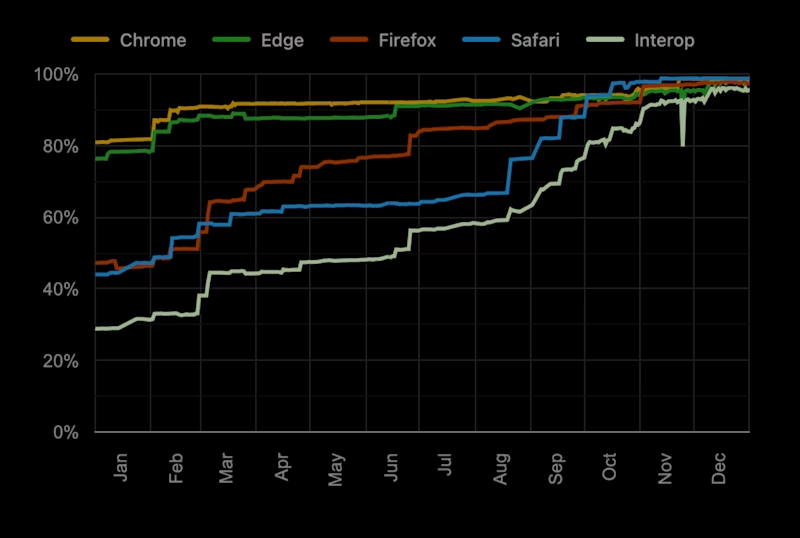
But what's included this year? Here's the full list from the WebKit blog.
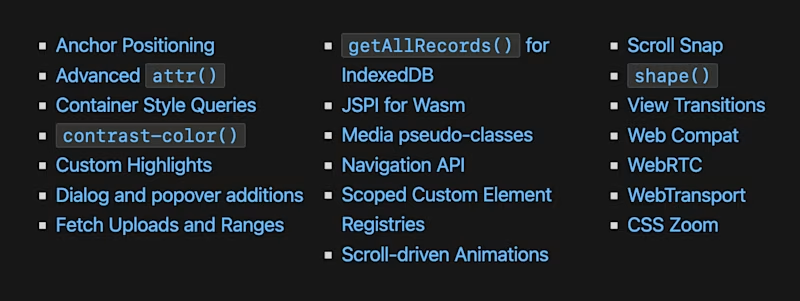
I haven't had the time to dive in yet, but this looks like a decent list, and I might go deeper next week. I do miss sizes=auto for images, though.
But I'm not complaining, so let's get to the web dev goodies of this week!
Web Weekly housekeeping
Last week I asked you to reply to this email to check if it would improve this newsletter's open rate. And well... it was quite a week. I doxxed myself with around 60 emails hitting my inbox on the first day. Writing this newsletter sometimes feels a bit lonely, but it really reminded me of why I sit down every week. Having all these replies and conversations gave me a nice and fuzzy feeling!
Also, Mark, Michelle, Derek, Zoran, Evan, and Francis provided testimonials for the Web Weekly site, and Michal, Jason, and Jules started to support Web Weekly with a monthly coffee donation! A special thanks goes to all of you!
So, thank you all for reading along and if you enjoy Web Weekly, share it with your friends and family.
A quick "repost" really helps this indie newsletter reach more people. Thank you! ❤️
Something that made me smile this week

Look, I'm not saying that you should ever, ever use git-shitstorm, but the level of evilness really made me smile.
No code
- Performance Reviews Are the Scorecard of Capitalism → "If review season is the only time you hear feedback about your work, that's a problem."
- Notes on Not Posting → "The internet doesn't need you. It's good to be reminded of that once in a while."
- How I estimate work as a staff software engineer → "It is not possible to accurately estimate software work." 😱
Use @layer for your reset styles
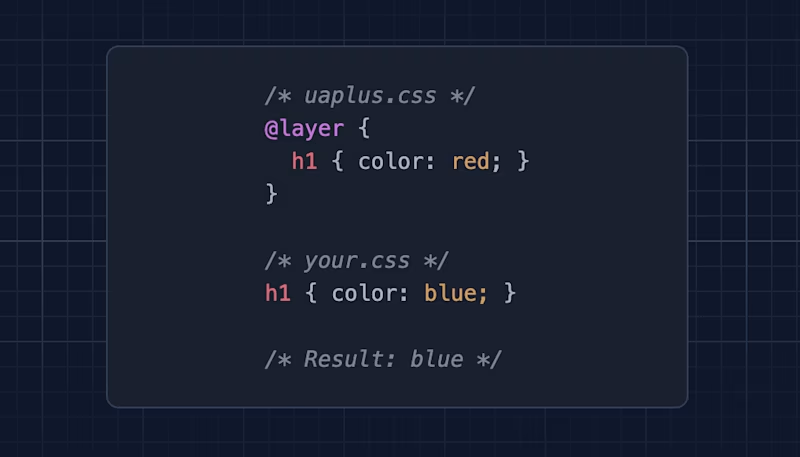
Confession time: I'm still not using @layer even though it's been baseline supported since 2022. Manuel describes how to use CSS layers to deal with CSS reset specificity. Great trick!
@scope in inline <style> blocks
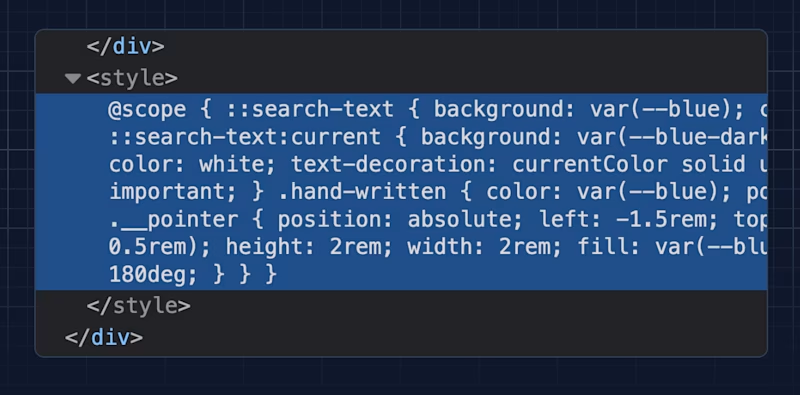
And speaking of styles not overwriting each other... with @scope entering the baseline, I could finally drop some odd class conventions so that my site's new custom components aren't clashing with the overall styles.
I love this! We can now drop <style> elements right into the page, use @scope, and the styles will be applied only to the surrounding container. Good stuff.
If you haven't used @scope, here's why you might want to prefer it over naming conventions.
using works in Node.js
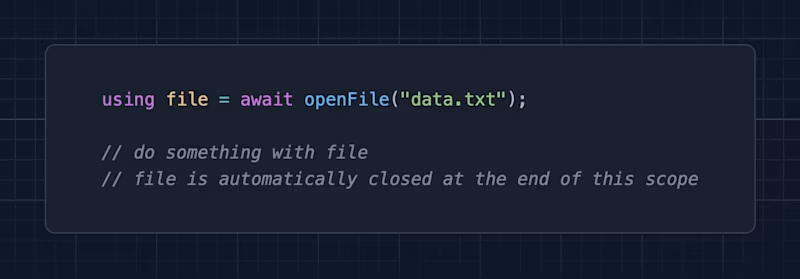
I read about the using declaration syntax in early JS proposals, but thanks to Matt, I learned that it actually works in Node.js 24 today. What's using, though?
With a little bit of JS trickery and well-known symbols, objects can be cleaned up when their variables go out of scope. There's no need for try/catch/finally or other dances.
Does it work in browsers, too? We're close. Safari has yet to join the party.
And if you want to go really deep into using, generators, and WeakSets/WeakMaps, Mat has you covered over on the Piccalilli blog.
The new era of customizable select elements
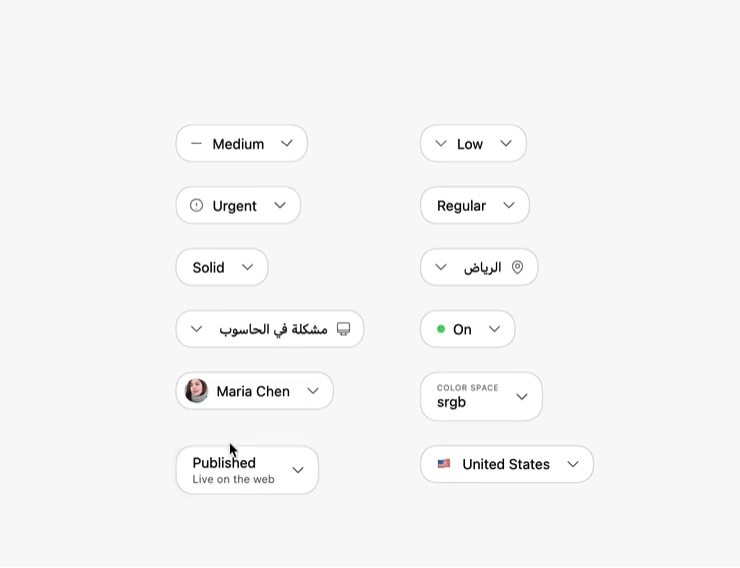
Adam published a post pushing all the new web and CSS features to the limit. Granted, all this select sugar is mainly a Chrome-only thing right now, but this post feels like a reference piece of cutting-edge CSS in 2026.
Put some time on your calendar and explore ::picker-icon, ::checkmark, <selectedcontent>, @starting-style, and many more new features!
But what about Safari and Firefox? Well, they'll render good old select elements like the ones we've been dealing with for the last 10 years. So no big deal.
And if this isn't enough select magic for you today, here's Brecht with selects that don't even look like selects anymore.
The wonderful weird web – gradient.horse

You might remember drawafish.com — an absolute internet classic. Today's wonderful weird web plug is the same thing, but with horses, music, and some CSS gradients.
The State of CSS in 2026
You might have noticed that the yearly Web Almanac didn't include a CSS chapter for a couple of years, because analyzing all that data is a ton of work and things are "a little complicated".
Bart, who maintains some popular CSS analyzers, took the matter into his own hands and "just" wrote the tooling to analyze the CSS of 100k popular domains. What an initiative! ❤️
If you're into fun stats like the biggest discovered stylesheet being 52MB, sites with 4,858 @support rules, or the highest found selector specificity being 146,1546,159, this post is for you.
Side note: of course, the report also includes useful stats like the one that @container queries were used on 10% of the crawled pages!
The logo soup problem
If you're working in startup land like I do, you usually have a logo collection showing off how many big brands use your product somewhere on the marketing site. And most of the time, these logo clouds (lanes? soups?) look terrible because all the logos have different ratios, heights, and perceived weights.
Sanity released a React library to tame this problem using "the Proportional Image Normalization Formula". Use these words if you want to sound smart at parties.
Regardless, I added the component to the WW site and it works great!
And if you prefer vanilla JS, here's a port of the algorithm.
Throttle/block individual requests in Chrome DevTools
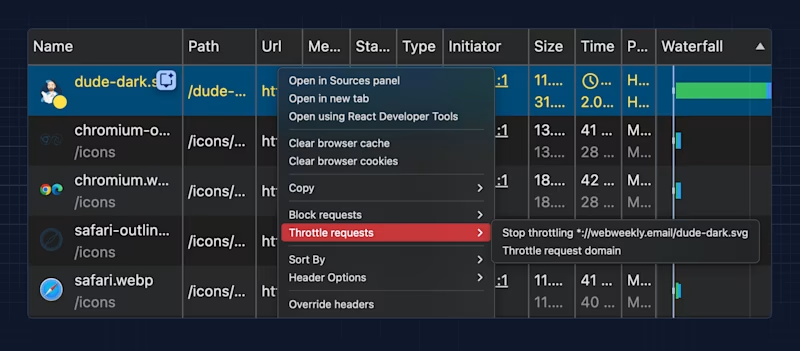
Quick reminder: if you want to debug if and how certain resources affect rendering, Chrome DevTools allows you to throttle/block individual resources.
On reusable OS font sizes in browsers...
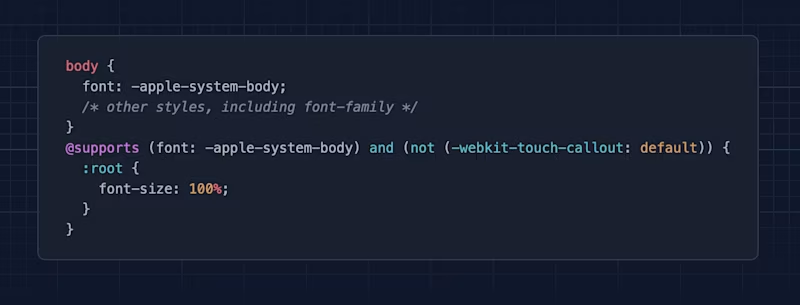
Last week I plugged the new text-scale element, which enables Chrome to also bump up the font size if folks have increased font size settings in their OS.
So far so good. Adrian had a deeper look at how this behavior could work across all browser engines. And things are complicated. Or as he puts it, a bit Frankenstyle.
Random MDN – <search>
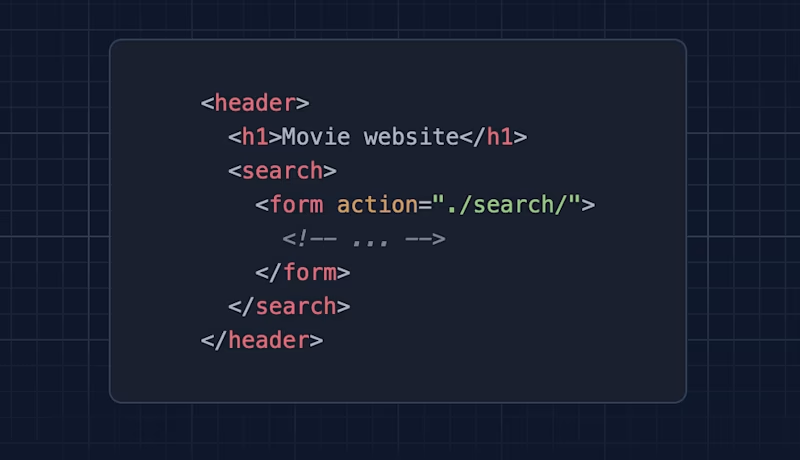
From the unlimited MDN knowledge archive...
I caught myself thinking "Right! There is a search element in HTML" this week. I had kind of forgotten about it (don't judge). So here's a reminder about the power of semantic HTML.
TIL recap – header/footer elements can change their assigned ARIA role
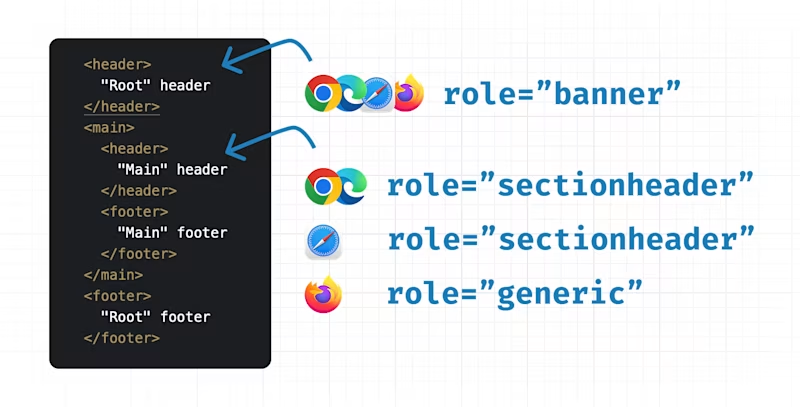
Speaking of semantic markup, if you use elements like header or footer, they get some specific ARIA roles applied. It's banner for header elements and contentinfo for footer elements.
But do you know that these elements can change their role depending on where they're placed in the DOM? There's been a rather recent change to the ARIA spec, and browsers have started to ship it!
Find more short web development learnings in my "Today I learned" section.
New scroll "stuff" in the baseline
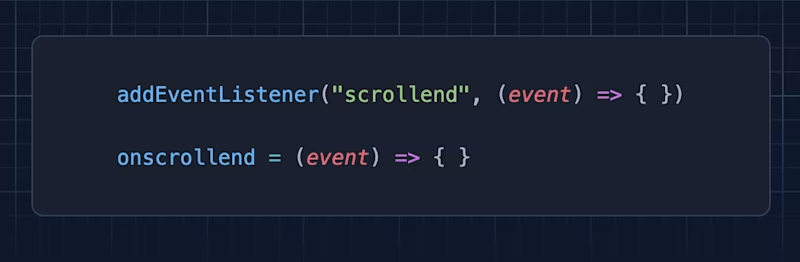
If you ever wanted to listen to a scroll end event, now you can. With Safari 26.2, scrollend entered the baseline!
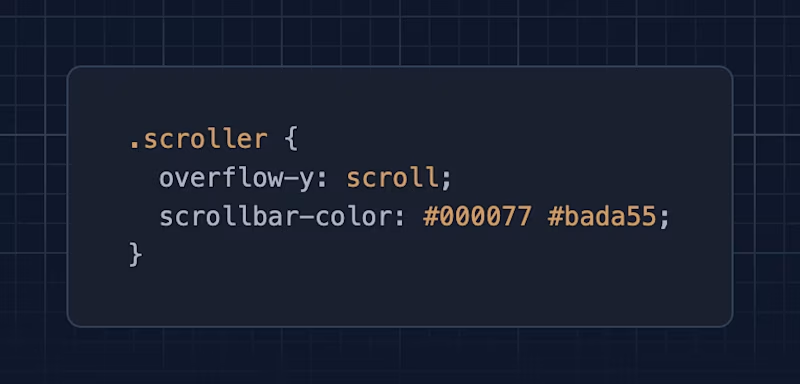
And if colored scrollbars are your thing, scrollbar-color works across browsers now, too!
Three valuable projects to have a look at
- williamtroup/Heat.js – A JavaScript library for generating interactive heatmaps.
- macaly/almostnode – Node.js in your browser. 👈 This is very cool!
- griddy-icons/griddy-icons – A lightweight icon library.
A new Tiny Helper
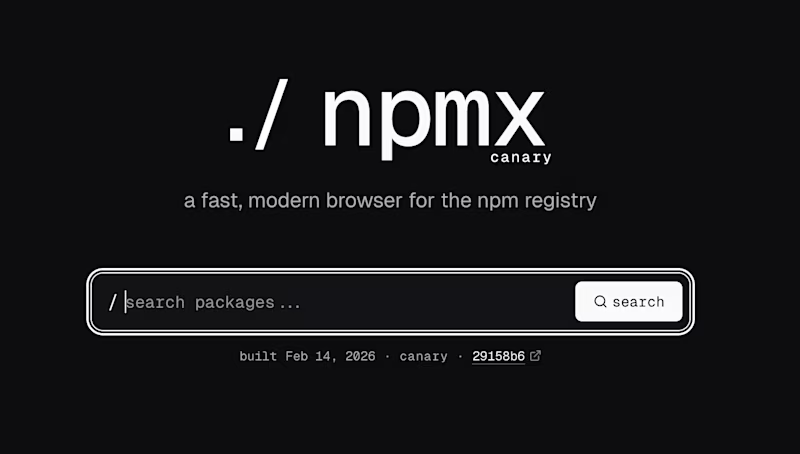
If you're slightly worried about npm and npmjs.com, you're not alone. Especially since the website doesn't seem to have received updates in ages. npmx is a modern alternative built by the community. The site looks very slick, and especially the file explorer is such an improvement!
It stands out that the project isn't much older than a month and has already gathered 178 contributors. Is this one of the rare examples showing that open source and community-led efforts work? I hope so!
Find more single-purpose online tools on tiny-helpers.dev.
Thought of the week
I keep thinking about Anil's quote, it's such a smart and wise take.
Don't let your job get in the way of your career.
Did you learn something from this issue?
❤️ If so, join 37 other Web Weekly supporters and give back with a small monthly donation on Patreon or GitHub Sponsors.
This is all, friends!
Loved this email? Hated this email? I want to hear about it!
If you think something needs improvement or something sparked some joy, reply to this email because I want to know more!
And with that, take care of yourself — mentally, physically, and emotionally.
I'll see you next week! 👋
Join 6.5k+ developers and